Hey guys, how are you doing today? Just got something to discuss today.My today's post is how to move a blog between accounts
How to Move a blog between accounts
Continue reading →
How to Move a blog between accounts
- Sign in to Blogger with Account 1, which we'll assume is the account containing the blog.
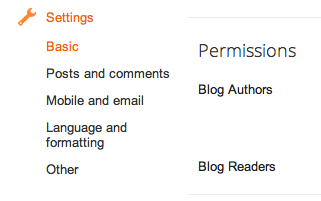
- Go to the "Permissions" section under Settings | Basic tab.
- Click the Add Authors button and send an invitation to the owner of Account 2, the account to which you'd like to move the blog.
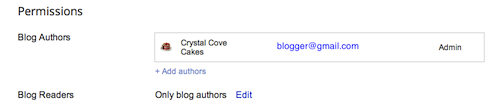
- Wait for the owner of Account 2 to accept the invitation. If you're sharing a computer, you'll need to sign out of Account 1 first, or each use a different browser.
- Once Account 2 has joined the blog, Account 1 can sign in again and go back to the Settings | Basic tab.
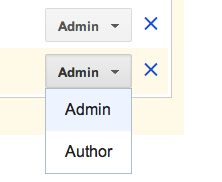
- Click the drop-down menu next to Account 2 and choose "Admin."
- Click the X next to Account 1 to remove Account 1.
 Do you know that having a language translation guide in your blog will be especially handy if you cater to an international audience.
 In blogger we always see a static template that usually has a header, a navigation bar, a sidebar, post body and a footer.
 First of all, let me say this - thanks for reading this post. Now let’s move on to the post at hand…
Have you noticed the new Google+ auto sharing while using the blogger blog platform? Do you like it? Then please tell me why you like it by using the comment box below.
 Hey, this tutorial will be helpful if you have multiple author on your blog.Now to add authors to your blog,
 How are you doing?Hope you are really enjoying yourself over there?If yes then good to hear that.Today's topic goes '' 3 DIFFERENT WAYS TO ACQUIRE A DEGREE IN BLOGGING''